


FREQUENTLY ASKED QUESTIONs 
 Help
Center
Help
Center
- Basic Section
- Form Section
- Opt-in Section
- Footer Section
- MSFT Section
- Business-Iq
- V3
- Testing Section
- Sendmail Section
How to give a naming convention to the URL?
Which logo we should use for the campaign?
- To select the logo, first read the mail carefully.
- Check if there are any requirements available for a logo. If yes, then go with the requirement.
- If there are no requirements regarding the logo, then check the mail subject.
- If there is no reference to the logo in the mail subject, then check the asset and find the logo on the asset.
Which template we will use for the campaign?
- To make a template selection, first read the mail carefully.
- According to the campaign type and its language, you will choose the template here.
What are the campaign resource types or asset types?
-
Whitepaper
A whitepaper is a concise, authoritative document that presents information, research, or solutions on a specific topic, often written by experts to educate and inform readers.
For Example : PDF
- Infographic
An infographic is a visual representation of information, data, or knowledge designed to convey complex ideas in a clear and engaging format, using a combination of visuals, charts, and concise text for quick understanding.
For Example : External Link, Gartner link
-
Webinar
A webinar is a live, online presentation, seminar, or workshop conducted over the internet, allowing participants to interact, ask questions, and receive information or training from a presenter in real-time.
For Example : mp4 videos, future webinar, Ondemand Webinar
- Podcast
A podcast is a series of digital audio available for streaming or download, covering diverse topics and accessible on-demand through computers or mobile devices.
For Example : Podcast File (mp3)
What is the campaign flow for whitepaper asset?
The campaign page flow for Whitepaper
EDM Page  Landing Page Sendmail Page Whitepaper or PDF.
What is the campaign flow for Infographic asset?
The campaign page flow for Infographic
EDM Page Landing page Sendmail Page Infographic Link.
What is campaign flow for Webinar asset?
The campaign page flow for Webinar
EDM Page
Landing Page
Sendmail Page
Thankyou Page.
How to give a landing page button name to a campaign?
The name goes as per campaign resource type or asset type.
- If the asset is Whitepaper, the landing page button name is 'Download Now!'.
- If the asset is Infographic, the landing page button name is 'View Now!'.
- If the asset is Podcast, the landing page button name is 'Listen Now!'.
- If the asset is Webinar, the landing page button name is 'Watch Now!'.
Difference between single touch and double touch campaign?
Single Touch: In this typical campaign, users fill out a form to access an asset.
Double Touch: Users directly gain access to the asset without having to fill out a form.
Difference between single opt-in and double opt-in campaign?
Single Opt-in: This is a straightforward campaign. Users simply fill out the form and gain
access to the asset.
Double Opt-in: When user submit the form, user will be redirected to a Thank You page. User
will receive an email with access to the asset, and once user open it, users information will be saved
in the database.
Which form fields are in EY, RK, Captain Hook, Wizards, Sebastian, Angels, Mole JP, Spurs , Ocean JP ?
First Name*
Last Name*
Corporate Email*
Telephone*
Country*
Company Name*
Company Size*
State*
City*
Address*
Postal Code*
Industry*
Job Title* - Open Textfield
Which form fields are in Pluto, Tinkerbell, Giraffe, Genie, Cheetah?
First Name*
Last Name*
Corporate Email*
Telephone*
Country*
Company Name*
Company Size*
State*
City*
Address*
Postal Code*
Industry*
Job Title* - Dropdown
Which form fields are in Watchmen EY and Watchmen JG?
First Name*
Last Name*
Business Email*
Phone Number*
Country*
Company Name*
State*
City*
Street Address*
Zip Code*
Job Title*
Job Function*
Employer *
Which form fields are in Lao Tzu DE?
First Name*
Last Name*
Email Address*
Job Title*
Organization*
Business Phone*
Type of Government*
Address*
City*
State*
Zip*
Country*
What are the default Industries?
Advertising/Media/Publishing
Aerospace and Aviation
Agriculture and Forestry
Automotive
Banking/Accounting/Financial
Computer and Technology
Education and Training
Engineering and Construction
Entertainment/Travel/Hospitality
Food and Beverage
Government and Public Administration
Healthcare
Insurance
Legal Solutions
Manufacturing
Marketing
Non profit Organizations
Pharmaceutical
Public Relations
Real Estate
Retail and Wholesale
Scientific
Telecommunications
Transportation and Shipping
Utilities
VAR/VAD/System Integrator
Other - When the user clicks on other option, the open text field will be displayed.
What are the default Job Titles?
Director of Operations
Director of Finance
Purchasing Director
Procurement Director
IT Director
Technology Director
Director of Reservations
Director of Loyalty
Director Cargo
VP of Operations
VP of Finance
VP of Director
Procurement Vice President
VP IT
Technology VP
VP of Reservations
VP of Loyalty
VP of Cargo
Head of Operations
Chief Operations Officer
Head of Customer Loyalty
Chief Customer Loyalty Officer
Head of Reservations
Chief Reservations Officer
Head of Finance
Chief Finance Officer
Head of Purchasing
Head of Procurement
Chief Purchasing Officer
Chief Procurement Officer
Head of Information Technology
Chief Technology Officer
Head of Cargo
Chief Cargo Officer
Other - When the user clicks on other option, the open text field will be displayed.
What are the default job functions for the WATCHMEN REGISTRATION FORM TEMPLATE?
Agency Leadership
Business & Operations
Communications & Marketing
Financial/Contract Management
Human Resource Management
Technology Management
Other
What are the default Employer for the WATCHMEN REGISTRATION FORM TEMPLATE?
Federal Government
State/Local Government
Private Sector
Government Contractor
Department of Defense (Civilian)
Department of Defense (Military)
Retired
Academia
Media
Non-Profit
What is the difference between Watchmen EY and Watchmen JG?
For Watchmen EY we use GovExec360 Logo and Watchmen JG we use GovExec Logo.
What is the default Company Size for Firestorm (RK)?
1-99
100-499
500-999
1,000-4,999
5,000-9,999
10,000+
Which opt-ins are used in EY, RK, Captain Hook, Wizards, Sebastian, Angels, Mole JP, Spurs , Ocean JP?
Opt-In I :
I would like to receive information from suppliers sponsoring this
content and willing to share the information above with Enterprisetalk.
Opt-In II :
By checking this box, I agree that EnterpriseTalk can share my data with Partners so that Partners can
contact me by email or phone and provide more information about this content.
Which opt-ins are used in Pluto, Tinkerbell, Giraffe, Genie, Cheetah?
Opt-In I :
I would like to receive information from suppliers sponsoring this
content and willing to share the information above with Enterprisetalk.
Opt-In II :
By checking this box, I agree that EnterpriseTalk can share my data with Partners so that Partners can
contact me by email or phone and provide more information about this content.
Which opt-in is used for Watchmen?
Opt-In :
Any information you supply is subject to our partner's privacy policy. In order to
provide you with this free content, EnterpriseTalk and our partner may share this registration
information and other information you have provided to them with content sponsors.
Which opt-in is used for TCO links?
Opt-In :
By checking this box, you agree that your personal data may be shared
with our content provider vendor name and their affiliates vendor
name for the purposes of communicating their relevant services and events. Details on the
processing of your personal data for marketing purposes by vendor name are described
in the vendor name Privacy Statement.
Which footer is used for EnterpriseTalk?
Click here to Unsubscribe | EnterpriseTalk Privacy Policy | Do Not Sell My
Information
Copyright © 2024 EnterpriseTalk
1611 E 2nd St. Suite #137
Casper, WY 82601
United States of America
Example
Click here to Unsubscribe | EnterpriseTalk Privacy Policy | Do Not Sell My Information
Copyright © 2024 EnterpriseTalk
1611 E 2nd St. Suite #137
Casper, WY 82601
United States of America
Which footer is used for TCO?
Syntax
© 2024 Biz-Tech-Insights | Click here to unsubscribe | Biz-Tech-Insights Privacy Policy
Example
© 2024 Biz-Tech-Insights | Click here to unsubscribe | Biz-Tech-Insights
Privacy Policy
How to create folder on filezilla?
- Open TCO MSFT directory in server.
- Select the year & quarter for which you’re creating the campaign.
- Then select the country from the list of folders
- And then the language for which you’re creating the campaign.
- If the country folder or the language folder doesn’t already exist then create it.
- Create a folder inside the language directory and name it by the title of your campaign. Add “-” instead of spaces.
Naming convention for the MSFT Campaign file?
- Name the edm files as “edm.html”, sendmail file as “sendmail.php”, landing file as “index.php”.
- Asset and Cover Image can be named by your choice. Example: image.png, asset.pdf
What is the default footer for the MSFT campaign email reply?
Syntax
You received this email because you signed up to receive content from Biz Tech Insights.
You can access our Privacy Policy here, or click here to unsubscribe.
Vendor Privacy Policy
You received this email because you signed up to receive content from Biz Tech Insights.
You can access our Privacy Policy here, or click here to unsubscribe.
Planview Privacy Policy
List of countries with country code.
| Country | Country Code |
|---|---|
| Afghanistan | AF |
| Albania | AL |
| Algeria | DZ |
| American Samoa | AS |
| Andorra | AD |
| Angola | AO |
| Anguilla | AI |
| Antarctica | AQ |
| Antigua and Barbuda | AG |
| Argentina | AR |
| Armenia | AM |
| Aruba | AW |
| Australia | AU |
| Austria | AT |
| Azerbaijan | AZ |
| Bahamas | BS |
| Bahrain | BH |
| Bangladesh | BD |
| Barbados | BB |
| Belarus | BY |
| Belgium | BE |
| Belize | BZ |
| Benin | BJ |
| Bermuda | BM |
| Bhutan | BT |
| Bolivia | BO |
| Bosnia and Herzegovina | BA |
| Botswana | BW |
| Bouvet Island | BV |
| Brazil | BR |
| British Indian Ocean Territory | IO |
| Brunei Darussalam | BN |
| Bulgaria | BG |
| Burkina Faso | BF |
| Burundi | BI |
| Cambodia | KH |
| Cameroon | CM |
| Canada | CA |
| Cape Verde | CV |
| Cayman Islands | KY |
| Central African Republic | CF |
| Chad | TD |
| Chile | CL |
| China | CN |
| Christmas Island | CX |
| Cocos (Keeling) Islands | CC |
| Colombia | CO |
| Comoros | KM |
| Congo | CG |
| Congo, the Democratic Republic of the | CD |
| Cook Islands | CK |
| Costa Rica | CR |
| Cote D'Ivoire | CI |
| Croatia | HR |
| Cuba | CU |
| Cyprus | CY |
| Czech Republic | CZ |
| Denmark | DK |
| Djibouti | DJ |
| Dominica | DM |
| Dominican Republic | DO |
| Ecuador | EC |
| Egypt | EG |
| El Salvador | SV |
| Equatorial Guinea | GQ |
| Eritrea | ER |
| Estonia | EE |
| Ethiopia | ET |
| Falkland Islands (Malvinas) | FK |
| Faroe Islands | FO |
| Fiji | FJ |
| Finland | FI |
| France | FR |
| French Guiana | GF |
| French Polynesia | PF |
| French Southern Territories | TF |
| Gabon | GA |
| Gambia | GM |
| Georgia | GE |
| Germany | DE |
| Ghana | GH |
| Gibraltar | GI |
| Greece | GR |
| Greenland | GL |
| Grenada | GD |
| Guadeloupe | GP |
| Guam | GU |
| Guatemala | GT |
| Guinea | GN |
| Guinea-Bissau | GW |
| Guyana | GY |
| Haiti | HT |
| Heard Island and Mcdonald Islands | HM |
| Holy See (Vatican City State) | VA |
| Honduras | HN |
| Hong Kong | HK |
| Hungary | HU |
| Iceland | IS |
| India | IN |
| Indonesia | ID |
| Iran, Islamic Republic of | IR |
| Iraq | IQ |
| Ireland | IE |
| Israel | IL |
| Italy | IT |
| Jamaica | JM |
| Japan | JP |
| Jordan | JO |
| Kazakhstan | KZ |
| Kenya | KE |
| Kiribati | KI |
| Korea, Democratic People's Republic of | KP |
| Korea, Republic of | KR |
| Kuwait | KW |
| Kyrgyzstan | KG |
| Lao People's Democratic Republic | LA |
| Latvia | LV |
| Lebanon | LB |
| Lesotho | LS |
| Liberia | LR |
| Libyan Arab Jamahiriya | LY |
| Liechtenstein | LI |
| Lithuania | LT |
| Luxembourg | LU |
| Macao | MO |
| Macedonia, the Former Yugoslav Republic of | MK |
| Madagascar | MG |
| Malawi | MW |
| Malaysia | MY |
| Maldives | MV |
| Mali | ML |
| Malta | MT |
| Marshall Islands | MH |
| Martinique | MQ |
| Mauritania | MR |
| Mauritius | MU |
| Mayotte | YT |
| Mexico | MX |
| Micronesia, Federated States of | FM |
| Moldova, Republic of | MD |
| Monaco | MC |
| Mongolia | MN |
| Montserrat | MS |
| Morocco | MA |
| Mozambique | MZ |
| Myanmar | MM |
| Namibia | NA |
| Nauru | NR |
| Nepal | NP |
| Netherlands | NL |
| Netherlands Antilles | AN |
| New Caledonia | NC |
| New Zealand | NZ |
| Nicaragua | NI |
| Niger | NE |
| Nigeria | NG |
| Niue | NU |
| Norfolk Island | NF |
| Northern Mariana Islands | MP |
| Norway | NO |
| Oman | OM |
| Pakistan | PK |
| Palau | PW |
| Palestinian Territory, Occupied | PS |
| Panama | PA |
| Papua New Guinea | PG |
| Paraguay | PY |
| Peru | PE |
| Philippines | PH |
| Pitcairn | PN |
| Poland | PL |
| Portugal | PT |
| Puerto Rico | PR |
| Qatar | QA |
| Reunion | RE |
| Romania | RO |
| Russian Federation | RU |
| Rwanda | RW |
| Saint Helena | SH |
| Saint Kitts and Nevis | KN |
| Saint Lucia | LC |
| Saint Pierre and Miquelon | PM |
| Saint Vincent and the Grenadines | VC |
| Samoa | WS |
| San Marino | SM |
| Sao Tome and Principe | ST |
| Saudi Arabia | SA |
| Senegal | SN |
| Serbia and Montenegro | CS |
| Seychelles | SC |
| Sierra Leone | SL |
| Singapore | SG |
| Slovakia | SK |
| Slovenia | SI |
| Solomon Islands | SB |
| Somalia | SO |
| South Africa | ZA |
| South Georgia and the South Sandwich Islands | GS |
| Spain | ES |
| Sri Lanka | LK |
| Sudan | SD |
| Suriname | SR |
| Svalbard and Jan Mayen | SJ |
| Swaziland | SZ |
| Sweden | SE |
| Switzerland | CH |
| Syrian Arab Republic | SY |
| Taiwan, Province of China | TW |
| Tajikistan | TJ |
| Tanzania, United Republic of | TZ |
| Thailand | TH |
| Timor-Leste | TL |
| Togo | TG |
| Tokelau | TK |
| Tonga | TO |
| Trinidad and Tobago | TT |
| Tunisia | TN |
| Turkey | TR |
| Turkmenistan | TM |
| Turks and Caicos Islands | TC |
| Tuvalu | TV |
| Uganda | UG |
| Ukraine | UA |
| United Arab Emirates | AE |
| United Kingdom | GB |
| United States | US |
| United States Minor Outlying Islands | UM |
| Uruguay | UY |
| Uzbekistan | UZ |
| Vanuatu | VU |
| Venezuela | VE |
| Viet Nam | VN |
| Virgin Islands, British | VG |
| Virgin Islands, U.s. | VI |
| Wallis and Futuna | WF |
| Western Sahara | EH |
| Yemen | YE |
| Zambia | ZM |
| Zimbabwe | ZW |
List of languages with language code.
| Language | Country Code |
|---|---|
| Afar | AA |
| Abkhazian | AB |
| Afrikaans | AF |
| Amharic | AM |
| Arabic | AR |
| Assamese | AS |
| Aymara | AY |
| Azerbaijani | AZ |
| Bashkir | BA |
| Byelorussian (Belarusian) | BE |
| Bulgarian | BG |
| Bihari | BH |
| Bislama | BI |
| Bengali | BN |
| Tibetan | BO |
| Breton | BR |
| Catalan | CA |
| Corsican | CO |
| Czech | CS |
| Welsh | CY |
| Danish | DA |
| German | DE |
| Bhutani | DZ |
| Greek | EL |
| English | EN |
| Esperanto | EO |
| Spanish | ES |
| Estonian | ET |
| Basque | EU |
| Persian | FA |
| Finnish | FI |
| Fiji | FJ |
| Faroese | FO |
| French | FR |
| Frisian | FY |
| Irish | GA |
| Scots Gaelic | GD |
| Galician | GL |
| Guarani | GN |
| Gujarati | GU |
| Hausa | HA |
| Hindi | HI |
| Croatian | HR |
| Hungarian | HU |
| Armenian | HY |
| Interlingua | IA |
| Interlingue | IE |
| Inupiak | IK |
| Indonesian | ID |
| Icelandic | IS |
| Italian | IT |
| Hebrew | IW |
| Japanese | JA |
| Yiddish | JI |
| Javanese | JW |
| Georgian | KA |
| Kazakh | KK |
| Greenlandic | KL |
| Cambodian | KM |
| Kannada | KN |
| Korean | KO |
| Kashmiri | KS |
| Kurdish | KU |
| Kirghiz | KY |
| Latin | LA |
| Lingala | LN |
| Laothian | LO |
| Lithuanian | LT |
| Latvian, Lettish | LV |
| Malagasy | MG |
| Maori | MI |
| Macedonian | MK |
| Malayalam | ML |
| Mongolian | MN |
| Moldavian | MO |
| Marathi | MR |
| Malay | MS |
| Maltese | MT |
| Burmese | MY |
| Nauru | NA |
| Nepali | NE |
| Dutch | NL |
| Norwegian | NO |
| Occitan | OC |
| Oromo (Afaan Oromo) | OM |
| Oriya | OR |
| Punjabi | PA |
| Polish | PL |
| Pashto (Pushto) | PS |
| Portuguese | PT |
| Quechua | QU |
| Rhaeto-Romance | RM |
| Kirundi | RN |
| Romanian | RO |
| Russian | RU |
| Kinyarwanda | RW |
| Sanskrit | SA |
| Sindhi | SD |
| Sangro | SG |
| Serbo-Croatian | SH |
| Sinhalese | SI |
| Slovak | SK |
| Slovenian | SL |
| Samoan | SM |
| Shona | SN |
| Somali | SO |
| Albanian | SQ |
| Serbian | SR |
| Siswati | SS |
| Sesotho | ST |
| Sundanese | SU |
| Swedish | SV |
| Swahili (Kiswahili) | SW |
| Tamil | TA |
| Telugu | TE |
| Tajik | TG |
| Thai | TH |
| Tigrinya | TI |
| Turkmen | TK |
| Tagalog | TL |
| Setswana | TN |
| Tonga | TO |
| Turkish | TR |
| Tsonga | TS |
| Tatar | TT |
| Twi | TW |
| Tahitian | TY |
| Uighur | UG |
| Ukrainian | UK |
| Urdu | UR |
| Uzbek | UZ |
| Vietnamese | VI |
| Volapuk | VO |
| Wolof | WO |
| Xhosa | XH |
| Yoruba | YO |
| Chinese | ZH |
| Zulu | ZU |
How to test the campaign?
- Step 1 : Read the mail carefully and understand the requirements.
- Step 2 : Check the link name as per the requirements, like the logo, campaign ID, language code, etc.
- Step 3 : Check the logo as per the requirements.
- Step 4 : Check the title and abstract according to the given.
- Step 5 : Check form fields as per campaign type.
- Step 6 : Check for additional requirements that are available. If requirements are available, then check as per them.
- Step 7 : Check opt-in.
- Step 8 : Check Button as per asset type. like Download Now, View Now, etc.
- Step 9 : Check that the form fields are validated.
- Step 10 : Fill out the form and check the mail.
- Step 11 : Check data on the resource publisher page.
- Step 11 : Check the footer.
How to test checkbox validation?
When the user clicks on the submit button without checking any checkboxes, it must show an error for the required field. (If the requirement for the checkbox is required.) The user must check at least one checkbox to proceed.
How to test email validation?
- When users click on the submit button without passing the email & hitting the enter,It must show an error in the required field.
- First go to temp mail website.
- Copy email from above link and paste into the email field.
- Check how many char accepted after dot(.).It must be accepted at least two char.e.g (Email@.in)
How to test sendmail email?
- First go to temp mail website.
- Copy email from the temp mail and paste into the email field.
- Press the enter button and go to the temp mail page.
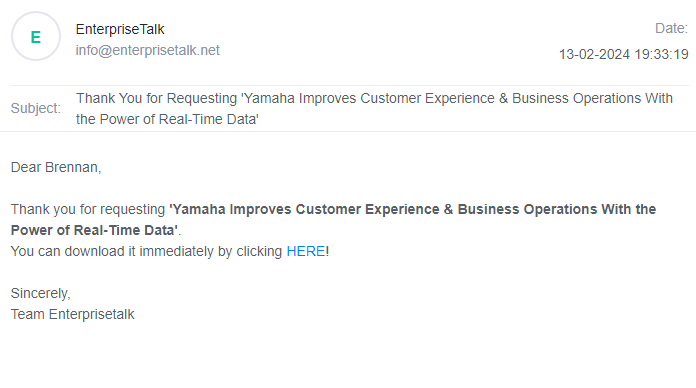
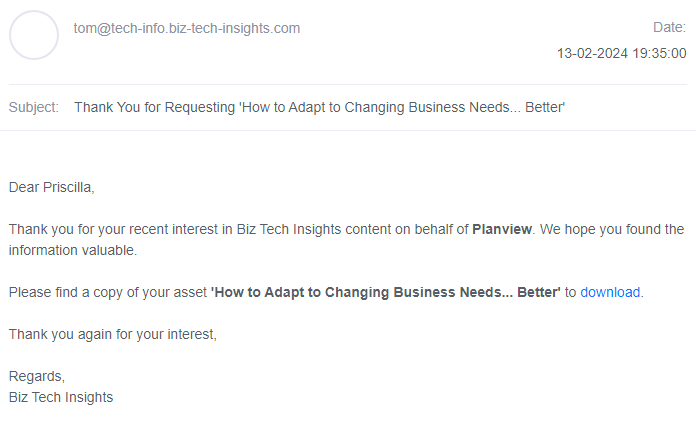
- Now check the content on email like its text, firstname value, asset title, email sender name, asset link, etc.
- Take a reference from the below screenshots.
Which opt-ins are used in EY, RK, Captain Hook, Wizards, Sebastian, Angels, Mole JP, Spurs , Ocean JP?
Opt-In I :
I would like to receive information from suppliers sponsoring this
content and willing to share the information above with Enterprisetalk.
Opt-In II :
By checking this box, I agree that EnterpriseTalk can share my data with Partners so that Partners can
contact me by email or phone and provide more information about this content.
Which opt-ins are used in Pluto, Tinkerbell, Giraffe, Genie, Cheetah?
Opt-In I :
I would like to receive information from suppliers sponsoring this
content and willing to share the information above with Enterprisetalk.
Opt-In II :
By checking this box, I agree that EnterpriseTalk can share my data with Partners so that Partners can
contact me by email or phone and provide more information about this content.
Which opt-in is used for Watchmen?
Opt-In :
Any information you supply is subject to our partner's privacy policy. In order to
provide you with this free content, EnterpriseTalk and our partner may share this registration
information and other information you have provided to them with content sponsors.
Which opt-in is used for TCO links?
Opt-In :
By checking this box, you agree that your personal data may be shared
with our content provider vendor name and their affiliates vendor
name for the purposes of communicating their relevant services and events. Details on the
processing of your personal data for marketing purposes by vendor name are described
in the vendor name Privacy Statement.
What is the use of our custom extension?
- It can check the duplicate data[], values, & and + symbols.
- It can also check footer address and year.
What about "&" and "+" symbol?
In values, we are not using & and + symbols. Instead, we convert into alphabets with values like and (&), plus (+).
What we will do after we got 50+ Job Titles / Industries?
If the client provides more than 50 job titles or industries, then we use the open text field.
Thank you email template / Sendmail content when there is a DE campaign
Guten Tag #name,
Vielen Dank für Ihr Interesse am Whitepaper 'Titile' von Vendor name.
Sie können es hier herunterladen und in Ruhe lesen: Whitepaper Download!
Mit freundlichen Grüßen,
Ihre Teams von Enterprisetalk & Vendor name
Example
Guten Tag Liza,
Vielen Dank für Ihr Interesse am Whitepaper 'Digital durchstarten - Finanzmanagement für KMU' von Qonto.
Sie können es hier herunterladen und in Ruhe lesen: Whitepaper Download!
Mit freundlichen Grüßen,
Ihre Teams von Enterprisetalk & Qonto
How can I determine if this is a Business IQ campaign
In the email subject line, the last word is 'Wish'. By identifying the word 'Wish', we can determine that this is a Business IQ campaign.
For Example : Crowdstrike Singapore Pte Ltd (Wish)
What is the purpose of the "Digital Approach" zip file?
The "Digital Approach" zip file contains various resources, including an email link page. This email link page is designed for use in digital communications and typically includes HTML code and other elements to create an email template or a page linked to email functionalities.
What is the purpose of the "TM Approach" zip file?
The "TM Approach" zip file contains content that is used for sending email content. This may include email templates, HTML files, and other assets intended for email campaigns or communication.
Which opt-in is used for Business IQ links?
I consent to the ascertainment, conversion, utilisation and dissemination of the data I have entered into this registration form. The B2B Media Group GmbH and originator/sponsor of the document may use my contact data for the purpose of B2B marketing (via e-mail, phone, display and postal) until such time as I withdraw my consent.
My agreement to the company and our partner can be revoked at any time via Unsubscribe Link below: Unsubscribe.
What are the rules/checklist of the V3 campaign?
- Is the opt-in checkbox unchecked by default?
- Are all fields labeled as mandatory in the lead form? (First, Last, Email, Phone, Title, Company, Region/State)
- Does the lead form block the user from submitting an incomplete lead form?
- Are all custom questions present with appropriate answer options?
- When submitting the lead, is the user given the correct asset?
- (For Germany/Austria) For double opt-in, are users receiving a follow-up double opt-in email? Confirm
- Is the image correct and is it in the right language?
- Does the imagery look blurry or distorted?
- Are the logos correct/blurry and updated?
- Is the client's privacy policy clearly listed near the opt-in? (Make sure the privacy policy is in-language)
- Please do not use Subheaders
- Bulleted list should NOT be Bolded. They will be bolded on the example landing pages but content syn partners need to be
- all unbolded.
- Does the abstract copy that was provided, match the copy seen on the landing page and promotional material?
- CTA should match and be in ALL CAPS and spelled exactly like the source page
- Please keep font sizes/style and all formating consistent
- Check for spelling, punctuation, etc.
- When possible, move image to the bottom of the body copy. If the image needs to be at the top, try to reduce the size of
- the image
- Headers should be correct language
- No extra spaces between paragraphs, CTAs, and images
- Bold and style the header
- Gartner sourcing footnote push under the image and tighten line spacing
- Gartner legal copy needs to be italicized and smaller
- Mailer: Push footnote sourcing copy under the CTA button
- Landing Page: footnote sourcing copy under the image
- Make sure there is no periods, commas, semicolons, etc. after each bullet. If this is showing on the INFA pages, they can
- be removed on the content syndication pages.
- Infographic: As image might not be supplied, make sure image has asset title only. Can suggest snapshot for clear image
- Copy should be Black (not blue)
- Avoid repetitive copy in the form fill areas. Example: Don't write "Download Now" at the top and bottom; differentiate
- verbiage if absolutely needed ("Download Now" at the top and "Get white paper" at the bottom)
- When landing page and mailer are in-language, please make sure all language on page is translated. The only exception is
- analyst reports. Note: flag when client landing pages might have incorrect languages.
- Superscript "R" and "TM" for resource guides. This may appear as a larger "R" on the example pages but the mark should
- be smaller (®) and to the top right (superscripted)
- If adding language to the top of the mailer or landing page, be sure that the asset referenced matches the CTA (white
- paper, webinar, etc) and do not include exclamation points (Example: Download Now!)
- Vendor to confirm if links/URLs are updated with new edits (different from previously provided URL)